Regular Expressions in .NET C#
Whilst the topic is fresh in my mind, I’m going to take stock and solidify what I have so far learned about Regex — a groovy abbreviation for ‘Regular Expressions’. Essentially Regex’s are a template for matching sequences of characters in data. In this blog entry, I will be looking at how the .NET framework accommodates our Regex needs
An example of a Regex requirement could be: “From that list of names find me all the people who have the first name Willy. What I want returned is their full name”.
In programming there are constructs in place to perform this kind of search, so in many cases a Regex would be overkill.
Before moving on, if you would like a more detailed introduction to the concept of regular expressions then I would recommend the Wikipedia page: http://en.wikipedia.org/wiki/Regex. However, if you search for regular expressions in your favourite search engine you will have a plethora of options to peruse.
Now, If you give me two minutes I’ll construct a coded example or two…………Regex.Match()
Here are the main data objects for this example; the collection of names (notice the white space after the surname, I’ll get to that shortly), and the name we want to filter — good old ‘Willy’:
static string[] NamesArray =
{
“Willy Smythe “,
“Golden Graham “,
“Krispie Rice”,
“Willy Simpson-Jones “,
“Fred Flintstone “,
“Ronald McDonald “,
“Jeff Stelling “,
“Willy Alfresco “
};
const string NameToMatch = “Willy”;
Now comes the method that implements the Regex functionality — and kindly displays the results:
private static void StaticRegexSingleMatch(string names, string nameToMatch)
{
string nameMatchRegex = nameToMatch + @”\s[^\s]+”;
Match match = Regex.Match(names, nameMatchRegex);
Console.WriteLine(match);
Console.Read();
}
Shall we talk about it? Why not…..
Firstly the method takes a string of the unfiltered data called names. You might have noticed that we used an array, the one where I said hold onto the thought about additional white spaces. Well, hold on for just a little longer.
Next we have the forename to filter — the ‘nameToMatch’ parameter.
What this method does initially is create a regular expression in a rew textual format. This expression says:
-
find a string starting with the name to match
-
followed by a white space character (\s)
-
followed by one or more characters that are not white spaces ([^\s]+)
In essence, we want to match the forename followed by a space and then the surname.
I’m still to explain those white spaces and that array we created but the string we passed to the method….now’s not the time to divulge rationales either — but we’re getting closer.
So far we’ve got our data and the sequence of characters we want to match, but we don’t really know what tools to use to utilise them. Step forward the Regex class’s Match method. This method takes the collection of data and the regular expression to be applied to, subsequently returning a *single *match. Even though we have a few Willy’s, this method will only find the first match and return it as a Match object.
We then use the console’s writeline method to display this match, after the method nicely calls ToString() on it — which conveniently adisplays the value of the matched expression.
All we need to do is call this method….and one more thing, the thing I keep staling over….
static void Main(string[] args)
{
string namesAsString = String.Concat(NamesArray);
StaticRegexSingleMatch(namesAsString, NameToMatch);
}
The big deal I’ve been leading up to is the first line of this method. By calling String.Concat on anarray, it appends each item to the former and returns it as a string. So, by adding those white spaces after the surname, no merging of names will occur.
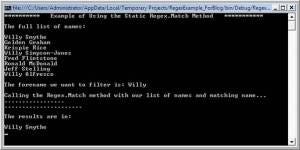
With some added text to accentuate the flowof this method, here’s what the output looks like:
Our regular expression does work — we extracted the full name whose forename is Willy. And, as mentioned, this method returns only a single match; hence none of the other Willy’s in the collection were matched and subsequently displayed.
What if we wanted to get all the matches……………………………………………..?Regex.Matches()
Here is our friend for extracting all the character sequences that match our regular expression. And below is a method utilising this method to get all the Willy’s in our collection.
private static void StaticRegexMultipleMatch(string names, string nameToMatch)
{
string nameMatchRegex = nameToMatch + @”\s[^\s]+”;
MatchCollection matches = Regex.Matches(names, nameMatchRegex);
foreach (Match match in matches)
{
Console.WriteLine(match);
}
Console.Read();
}
All that’s different is the return type — a MatchCollection. One of these fella’s (I hate that word, but use it to endear myself to Rolph Harris — I know he reads this blog) holds multiple matches and it’s enumerator exposes them, hence the foreach method which prints each one.
With some more accentuating text, below is the output (the call in main was the same, bar the new method name) from this method.
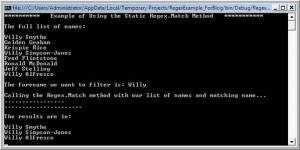
The Regex.Matches() method works as per the Regex.Match(), only this time it returns all the character sequences that match our expression and bundles them happily into a MatchCollection object.
We’re not done yet, there is one more query I need to resolve: How can I match a certain sequence and then extract only a specified portion(s) of it? The answer is to use named captures. To demonstrate them, I will use the non-static implementationin .NET for using Regex’s.Creating an Instance of Type Regex
Here is the alternative to the static implementation of extracting Regex’s. In this section I’ll also show how to get named captures.
The general flow is to:
-
- Create your expression.
-
- If you want to add named captures use the syntax
“(?
inner expression to match) “ anywhere inside your expression that you want to create an ‘inner sequence’. For the record they are called named captures.
- If you want to add named captures use the syntax
“(?
**Don’t Forget: **Named captures still work with static Regex.Match() and Regex.Matches().
-
- Create a Regex object, passing your expression to it’s constructor
-
- Call the Regex object’s Matches method (it also has a Match and both work as per the static versions explained above).
Here is my example using the same data as before. Only this time, I’ll match all the names with a forename Willy, but I’ll only return their surname — I’ll do this by using a named capture group called surname.
private static void MatchNameReturnSurname(string names, string nameToMatch)
{
stringregexString = nameToMatch + @”\s(?[^\s]+)”;
Regex nameMatchRegex = new Regex(regexString);
MatchCollection matches = nameMatchRegex.Matches(names);
foreach (Match match in matches)
{
Group matchGroup = match.Groups[“surname”];
Console.WriteLine(matchGroup);
}
Console.Read();
}
Again, the call in the Main method will only change to reflect the name of this latest method. And again, I’ve added text that accentuates the flow of the method displayed on the console.

Using named captures you can segment the matches returned by using the Regex class. This can save you Regexing a returned match and can also make reading code easier and more apparent.
Additionally, you can use the Regex class in two ways: by creating an instance of type Regex that wraps your expression; or the in-line calls to the static Regex.Match(es)(). Both of whom are happy to work with named captures.