Found My Spark — The Spark View Engine
The super customisable ASP.NET MVC framework gives us the choice when it comes to many things. View engine being just one of them. Having used the default Web Forms view engine on personal projects, the NVelocity view engine at work, I was exposed to the Spark view engine whilst watching Tekpub — Mastering ASP.NET MVC 2 , Episode 6 — View Engines by Rob Conery.
I fancied a bit of a play and a practical comparison with the Web Forms view engine I know and…..maybe not love. I wanted to compare the way I write code and conditionals in my view. I was keen to see what alternative there was to the obtrusive Web Forms gator tags. I’m already happy with NVelocity, but as an open-minded, pragmatic programmer, I felt obliged and compelled to explore Spark’s offering — especially as Rob Conery recommended I do so.
For in depth information, including documentation and library downloads, check the Spark View Engine web site.Setting up the Scenario
My first action, as in most cases, was to set up a brand spanking new ASP.NET MVC 2 web application. In this instance, I just called it the SparkViewEngineSampler. After doing which, I had a moment of contemplation and decided I would base this example on a Formula 1 race results page having just witnessed a dramatic Turkish Grand Prix (thank you Mr Vettel).
Whilst having my fun with Spark, I wanted to make sure I knew exactly how it handled view models. So before creating my view, I invented the F1Result class which would give my view selected data from today’s race. Here is that very class:
namespace SparkViewEngineSampler.Models
{
public class F1Result
{
public DateTime Date { get; set; }
public string Location { get; set; }
public string LapRecordHolder { get; set; }
public Dictionary<string, string> Result { get; set; }
public string FastestLap { get; set; }
public F1Result()
{
Date = new DateTime(2010, 05, 30);
Location = “Istanbul, Turkey”;
LapRecordHolder = “1:24.770 — JP Montoya (2005)”;
Result = new Dictionary<string, string>
{
{“Lewis Hamilton”, “88.47.620” },
{“Lewis Hamilton”, “2.60” },
{“Mark Webber”, “24.20” },
{“Michael Schumacher”, “31.10” },
{“Nico Rosberg”, “32.20” },
{“Robert Kubica”, “32.80” },
{“Felipe Massa”, “36.60” },
{“Fernando Alonso”, “46.50” },
{“Adrian Sutil”, “49.00” },
{“Kamui Kobayashi”, “65.60” },
};
FastestLap = “V Petrov Renault 1:29.165”;
}
}
}
As you can see, I populated the properties in the constructor for ease of use in this sample. I try to make a point of not cluttering the controller, even on a sample project like this. I live by the tenet of the “skinny controller”.
With the data, and subsequently the view model, taken care of, I just had the job of passing them to my index view in the home controller. I decided to use this page for brevity. Just for conclusiveness, here is that code:
[HandleError]
public class HomeController : Controller
{
public ActionResult Index()
{
F1Result f1 = new F1Result();
return View(f1);
}
public ActionResult About()
{
return View();
}
}
That was that in terms of setting up the infrastructure. From now on, I’ll be focusing on aspects pertaining directly to the views and view engines.The Web Forms View Engine
The default view engine, the much-maligned-for-its-gator-tags view-engine, is the Web Forms view engine. To use this facility to present the results of today’s race I did the following:
-
Amend the Home/Index.aspx page so that it inherited the generic ViewPage base class using F1Result as the type. In essence setting the view model to type F1Result.
-
To allow for intellisense with the model, the SparkViewEnginSampler.Models namespace was then imported into the page using the @Import declaration
-
I then added the code/tags to the view to get it display the model data how I wanted. The mark up looks like so:
<%@ Import Namespace=”SparkViewEngineSampler.Models” %>
<%@ Page Language=”C#” MasterPageFile=”~/Views/Shared/Site.Master” Inherits=”System.Web.Mvc.ViewPage” %>
<asp:Content ID=”Content1” ContentPlaceHolderID=”TitleContent” runat=”server”>
<%: String.Format(“{0} — F1 Grand Prix Result”, Model.Location) %>
asp:Content>
<asp:Content ID=”Content2” ContentPlaceHolderID=”MainContent” runat=”server”>
<%: String.Format(“{0} — F1 Grand Prix Result”, Model.Location) %>h2>
Race Detailsh3>
Date:
<%:Model.Date %>span>
Fastest Lap:
<%:Model.FastestLap %>span>
Lap Record Holder:
<%:Model.LapRecordHolder %>span>
div>
Resultsh3>
<%for (int i = 0; i < Model.Result.Count; i++)
{ %>
<%if (i % 2 == 0)
{ %>
style=”background-color: Green; color: White;”
<% } %>”>
<for each=”var racer in Model.Result”>
<if condition=”racerIndex % 2 == 0”>
if>
else>
| Positionth> | Driverth> | Race Timeth>
tr> thead> | ||||||||||||
|---|---|---|---|---|---|---|---|---|---|---|---|---|---|---|
| <%: i + 1%>td> | <%: Model.Result.Keys.ElementAt(i) %>td> | <%: Model.Result.Values.ElementAt(i) %>td>
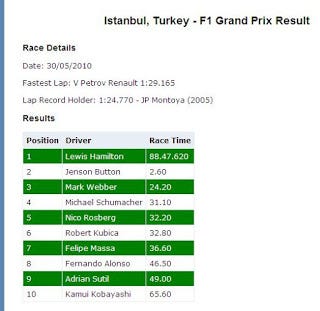
tr> <% } %> table> :Content> Observing this mark up extract, you can see I’ve accessed properties of the model, used a bit of C# code, a loop and conditional logic. When testing out a new view engine, I deliberately wanted to compare the use of these features. Talking through the above view code wouldn’t teach us much. Redoing it using the Spark view engine and comparing features, well — as Rob Conery would say “exciting!”. Here’s a quick peak at what the view looks like. Hmmmm, where is Sebastian Vettel’s name?
To enable this scenario to be recreated using the Spark view engine, the first step I took was to download the package from here. With that sitting nicely on my hard drive, I unzipped it and added a reference to Spark.dll and **Spark.Web.Mvc.dll **in my mvc application. The second stage of the configuration process was to add to some setup code in global.asax to be run at startup. There is an alternative way to do this, declaratively, by specifying the settings in web.config. It seemed easier to use global.asax, but that doesn’t mean it is the best way. Taken directly from the spark documentation page, here is their setup coded added to my global.asax file: protected void Application_Start() { var settings = new SparkSettings() .SetDebug(true) .AddAssembly(“SparkViewEngineSampler.Models.F1Result”) .AddNamespace(“System”) .AddNamespace(“System.Collections.Generic”) .AddNamespace(“System.Linq”) .AddNamespace(“System.Web.Mvc”); ViewEngines.Engines.Add(new SparkViewFactory(settings)); }Recreating the View from the Top DownThe Master I decided a good way to evaluate Spark by recreating the view would be to work from the top down, literally. So starting with the master page, Site.Master, to make it Spark compliant I had to rename it with .spark file extension. Easy enough. Straight after doing that I stripped out all the ASP.Net declarations and content placeholders to leave only pure html. And, here is that very markup — site.spark, formerly site.master: DOCTYPE html PUBLIC “-//W3C//DTD XHTML 1.0 Strict//EN” “http://www.w3.org/TR/xhtml1/DTD/xhtml1-strict.dtd”> F1 Resultsh1<> div> | <%: i + 1%>td> | ${Model.Result.Keys.ElementAt(i)}td> | ${Model.Result.Values.ElementAt(i)}td>
tr> <% } %> And, here’s what I produced using Spark: | |||||||||
| ${racerIndex + 1}td> | ${racer.Key}td> | ${racer.Value}td>
tr> for> tbody> Why not dive right in and inspect exactly what I did? First up, there is no for loop — what!? What we have is only a for each loop which is actually a tag with an ‘each’ element. Well, that’s nifty. But what if I need to keep track of the count/number of iterations? Then you use the name of the local (to the for each loop) variable with suffix index. See racerIndex in the mark-up above. This is the same for the count, e.g. racerCount. There’s a few more too. See the Spark Documentation for exhaustive information. First block of code inside my for each loop is a conditional. Again, it is styled as tags, as (not valid) html tags.By now I, and hopefully you, realise they stick to their philosophy of ‘helping you to think in terms of html/mark-up when you are looking at such a page. From then on it is just a case of accessing variables and writing out their values using ${} inline code syntax. In this case, the only real difference between the code is that Web Forms has the obtrusive gator tags, while Spark replaces them with tags. For more complex scenarios, it may be easier to discern which view engine really is the best. But I’ve done my piece in reviewing the basics. I’ll leave you with the mak-up in full for both pages………Web Forms View Engine <%@ Import Namespace=”SparkViewEngineSampler.Models” %> <%@ Page Language=”C#” MasterPageFile=”~/Views/Shared/Site.Master” Inherits=”System.Web.Mvc.ViewPage” %> <asp:Content ID=”Content1” ContentPlaceHolderID=”TitleContent” runat=”server”> <%: String.Format(“{0} — F1 Grand Prix Result”, Model.Location) %> asp:Content> <asp:Content ID=”Content2” ContentPlaceHolderID=”MainContent” runat=”server”> <%: String.Format(“{0} — F1 Grand Prix Result”, Model.Location) %>h2> Race Detailsh3> Date: <%:Model.Date.ToShortDateString() %>span> Fastest Lap: <%:Model.FastestLap %>span> Lap Record Holder: <%:Model.LapRecordHolder %>span> div> Resultsh3> <%for (int i = 0; i < Model.Result.Count; i++) { %> <%if (i % 2 == 0) { %> style=”background-color: Green; color: White;” <% } %>”>
|