Get The First Date In A Week, Given The Week’s Number — With Help From BDD

This week I had an interesting task which was to calculate the first and last day in a week given the week number. In the wider context, this was part of a filtering system to sift through records and tell the user which ones were created in a certain week — accessed by its week number.
So, what I’m going to do in this blog post is recreate that code using SpecFlow to write and implement specs and some basic mathematical formulation skills (very light, don’t worry).
Before becoming the conjuror of some magical specs, let me first show you how week numbering works for the hypothetical company this date calculation is being created for:
Outlook’s Default Week Numbering — Just What We Need
As you can see above, this is exactly how Outlook’s default week numbers work. Week number 1 contains the last four days of December 2009 and the first three days of January 2010. Obviously the yearly overlap varies year-by-year.Writing The Specs
With the formalities out of the way and the proposed scenario explained, the first step I’ll take is to write the specs. Well, after creating a new class library called DateCalculationService, and then adding a new class library to the solution called Specs. Then adding a reference to TechTalk.SpecFlow.dll and nunit.framework.dll so I can use SpecFlow.
After adding a feature to the Specs project, I’m just about ready to get cracking with the specs. But first, let’s just visually confirm exactly how my solution is currently set up.
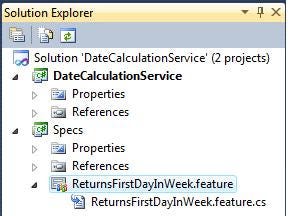
Solution Setup After Adding Feature File
The image above shows I’ve named my feature file ReturnsFirstDayInWeek – trying my best to describe the ‘business rule’ or behavioural requirement of my date calculation service.
Thinking about the edge cases and possible freak scenarios, I am certain that the following scenarios should all form part of the tests to give me confidence that my service will be faultless:
· First week in a year
· Second week in a year
· Last week in a year
· Random weeks in a year
· First, second and last week in a leap year
· Random weeks in different years
And, here are the specs….
Feature: Should Return The First Day In The Week
In order to perform date-related filtering
As a Developer
I need to be given the first day in a week from a week number and year
Scenario: First Week In A Year
Given I have specified the year 2010
And I have specified week 1
When I request the first day in the week
Then I should be given the date 28/12/2009
Scenario: Second Week In A Year
Given I have specified the year 2010
And I have specified week 2
When I request the first day in the week
Then I should be given the date 04/01/2010
Scenario: Last Week In A Year
Given I have specified the year 2010
And I have specified week 52
When I request the first day in the week
Then I should be given the date 20/12/2010
Scenario: Randomly-Selected Week In A Year
Given I have specified the year 2010
And I have specified week 32
When I request the first day in the week
Then I should be given the date 02/08/2010
Scenario: First Week In A Leap Year
Given I have specified the year 2008
And I have specified week 1
When I request the first day in the week
Then I should be given the date 31/12/2007
Scenario: Second Week In A Leap Year
Given I have specified the year 2008
And I have specified week 2
When I request the first day in the week
Then I should be given the date 07/01/2008
Scenario: Last Week In A Leap Year
Given I have specified the year 2008
And I have specified week 52
When I request the first day in the week
Then I should be given the date 22/12/2008
Scenario: Random Year 2001
Given I have specified the year 2001
And I have specified week 13
When I request the first day in the week
Then I should be given the date 26/03/2001
Scenario: Random Year 2005
Given I have specified the year 2005
And I have specified week 45
When I request the first day in the week
Then I should be given the date 31/10/2005Implementing Steps
What’s good about SpecFlow, and the way I have written these specs, is that I can use parameterised steps to save having to write every single line in each of those scenarios. So essentially, I can just write the steps for a single scenario — allowing me to add more scenarios which will use the existing steps, so no new code is needed.
Before writing those steps, I’ll use another good feature of SpecFlow — I’ll let it tell me exactly what step definitions I need by attempting to run the tests. The step definitions will then be shown in the output window.
Ok, I’m back and I’ve implemented my steps, they look exactly like these:
namespace Specs
{
[Binding]
public class ReturnsFirstDayInWeek
{
private int Year { get; set; }
private int Week { get; set; }
private DateTime FirstDayInWeek { get; set; }
[Given(@”I have specified the year (.*)”)]
public void GivenIHaveSpecifiedTheYear2010(int year)
{
Year = year;
}
[Given(@”I have specified week (.*)”)]
public void GivenIHaveSpecifiedWeek52(int week)
{
Week = week;
}
[When(@”I request the first day in the week”)]
public void WhenIRequestTheFirstDayInTheWeek()
{
FirstDayInWeek = DateCalculationService.DateCalculationService.GetFirstDayInWeek(Year, Week);
}
[Then(@”I should be given the date (.*)”)]
public void ThenIShouldBeGivenTheDate20122010(string date)
{
var dateValues = date.Split(‘/’).Select(d => Convert.ToInt32(d));
var day = dateValues.ElementAt(0);
var month = dateValues.ElementAt(1);
var year = dateValues.ElementAt(2);
DateTime correctDate = new DateTime(year, month, day);
Assert.IsTrue(FirstDayInWeek.ToShortDateString() == correctDate.ToShortDateString(),
“Actual Date Returned: “ + FirstDayInWeek.ToShortDateString());
}
}
}
I have to point out, first of all that I’ve coded by intention. The DateCalculationService doesn’t exist and obviously nor does its GetFirstDayInWeek method. It’s handy to have ReSharper, which makes coding in this BDD style a lot smoother.
Secondly, look at how little code there is. I just wrote about 15 specs, and using parameterised steps I can see everything I need on one screen — without losing any readability. Nice.Creating A Formula
With my specs all written, and the code to test them in place, I can now design an algorithm for calculating dates, wrap that in a method and then test away in a very efficient manner.
So what do I know? I know the variables that could be involved:
· Number of weeks in a year
· Number of days in a week
· ‘Offset’ — number of non-January days in week 1
I’ve got a plan. I’ll imagine that there is no offset — that the 1st January occurs on Monday (first day in the week). If I then go to week 2, I know the number of the first day is the 8th – number of days in the first week plus one. If then take into account the offset, I would need to push the day number backward in line with the offset.
Ok, here is my formula:
((Week number — 1) * 7) — Offset = Day Number In Year Of First Day In Week
Using a bit of mathematical convention, we can make that concise as follows:
x = ((y — 1) * D) — o
So x is the dependent variable, y is the independent (the one we change), D is the constant days-per-week, and o is the variable offset for the current year.Implementing The Code
If my formula is any good, then creating the code should be pretty easy. As per my intention in my steps, I’m going to make this a static method on a service class — this could easily be made into an extension method for the DateTime class. It could also be non-static with different options for different week-numbering systems. But my friend YAGNI says: “worry about that when you need to, dear”.
Here we go then; here’s what I have produced:
namespace DateCalculationService
{
public class DateCalculationService
{
private const int DaysPerWeek = 7;
public static DateTime GetFirstDayInWeek(int year, int week)
{
int yearsOffset = GetYearsOffset(year);
int dayNumberOfFirstDayInWeek = ((week - 1)*DaysPerWeek) — yearsOffset;
DateTime firstDayInYear = new DateTime(year, 01, 01);
DateTime firstDayInWeek = firstDayInYear.AddDays(dayNumberOfFirstDayInWeek);
return firstDayInWeek;
}
private static int GetYearsOffset(int year)
{
// create the first day in the year
DateTime firstDayInYear = new DateTime(year, 01, 01);
// find out what day it is and return the offset
switch (firstDayInYear.DayOfWeek)
{
case (DayOfWeek.Monday):
return 0;
case (DayOfWeek.Tuesday):
return 1;
case (DayOfWeek.Wednesday):
return 2;
case (DayOfWeek.Thursday):
return 3;
case (DayOfWeek.Friday):
return 4;
case (DayOfWeek.Saturday):
return 5;
case (DayOfWeek.Sunday):
return 6;
default:
throw new Exception(“Error calculating day of week. Input: “ + year);
}
}
}
}
Let’s walk through and I’ll explain what I’ve done.
Starting with the first important line, I’ve actually put the offset calculation into a separate method. It makes the main method look cleaner, no doubts, and highlights that the offset is a separate calculation which could be changed should we have a different week-numbering system.
All the GetYearsOffset method does, is work out, which day of the week January 1st occurs on for that year. It then knows how many non-January days are in that first week. Giving me the offset required to insert into my simple formula.
Following that, I actually calculate the day number (of the year) for the first day in the supplied week of the supplied year. With this day number, I just create the first day in the year, and add that number of days to the first day — giving me the day in the year that represents the day number I derived from the calculation.
Finally, the day in the week gets returned, all my specs pass, and the world again is the happy place I love….or is it?
Did the test pass? Does my mathematical brain have ego issues? Have I made a mess of what I thought to be a simple formula?
Actually, some of my tests did fail, because originally the wording in my feature file had a few typos. But when I corrected those, I got this:
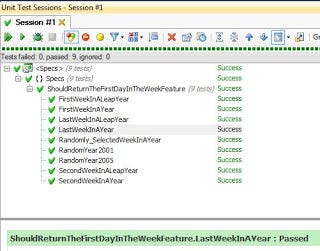 Conclusion
Having an organised personality, an organised methodology (BDD) and a facilitating tool like SpecFlow, means I am really at one with my current workflow. I start with the challenge of thinking up the scenarios – which helps me think about what my code will need to do from many angles.
I then get to implement my steps, again with SpecFlow. In this case, using its parameterised steps, means I have turned a lot of scenarios, into little amounts of spec code. It saves times, its extensible — I can add an infinite amount of date checks and I don’t need to write any more code to test it (you could argue I should, or could use tools like finesse if I’m so hung up about this feature — but its not quite right for this scenario).
I also have security knowing that if I change my code, my specs will tell me of any problems. As unit tests would, but just in more human-readable language. In this case there is no non-technical client, but there could be.
I also want to mention that having an organised approach helped me to think about the date calculation itself, without diving in and hacking around with code to try and get something to work. In this case, it worked first time. You can’t beat a good bit of planning.
So my findings are: slow down to speed up. Think about what you’re doing. Have a plan. Make sure you have your next few steps all planned – or at least know what you need to achieve and the high-level steps you are going to take to achieve it. Using BDD and tools like SpecFlow will encourage this thinking.
However, I’m always learning. One day soon I could realise that I have got things wrong and I’m not as efficient as I could be. All part of the fun.