Total BDD in ASP.NET MVC

In previous blog posts (BDD category) I’ve shown a liking for SpecFlow for implementing my BDD-style specs (tests). One of those posts showed me using SpecFlow for specs closer in nature to unit tests rather than acceptance tests — and this caused me avoidable problems afterwards.
Unit tests are there to be read easily — you follow the logic contained within a single method. The way SpecFlow works with its reusable step definitions is not conducive to this — and when my specs failed and I tried to work out what was wrong I found myself navigating massive step definition files to follow the logic of a small spec.
At this point I had the scars to prove SpecFlow just isn’t useful at the unit test level in most cases (SpecFlow source code shows great examples to the contrary).
But what about BDD — what about English-language used to describe my business rules that need to be checked and enforced in the domain itself? Well…
Along came this blog post by the S#arp architecture dudes (very smart boys) whose ASP.NET MVC stack I have been enjoying learning from recently. They are using MSpec for their unit tests because they want the benefits of BDD — even though their clients are developers like myself. When reading that blog post the light bulbs were going off in my head like a 90’s game show.Specs.Integration
Right now I’m going to walk you through my methodology – starting with my higher-level user story spec using SpecFlow and following that up with my more granular, unit test-style specs (context specifications) with MSpec (derived from the higher-level user story spec).
For this demonstration I started with the following:
- New MVC 3 app called TheSandwichGoRound — using the almighty Razor view engine
- New class library called Specs.Integration
o NuGet SpecFlow
o NuGet NUnit
o NuGet MvcContrib.Watin
- New class library called Specs
o NuGet Machine.Specifications
In this silly example here is a feature file I dreamed up and added to a folder called “features” in the Specs.Integration project:
Feature: Creating Sandwiches
In order to satisfy my appetite
As a hungry boy
I need to be able to create sandwiches
Scenario: Success
Given I have navigated to the Create Sandwich page
And I have typed in a unique name
When I click Create
Then I should be viewing the details of my new sandwich
And here is the step definition, that when successful confirms my product has the required behaviours (watch the tests return “not implemented” and SpecFlow will give you the required definitions in the output window) (my step file lives in a folder called “steps” in the Specs.Integration project):
namespace Specs.Integration.steps
{
[Binding]
public class SandwichSteps
{
private const string Baseurl = @”http://localhost/TheSandwichGoRound”;
private IE _browser;
private string SandwichName;
private IE Browswer
{
get { return _browser ?? (_browser = new IE()); }
}
[Given(@”I have navigated to the Create Sandwich page”)]
public void GivenIHaveNavigatedToTheCreateSandwichPage()
{
Browswer.GoTo(Baseurl + @”/Sandwiches/Create”);
}
[Given(@”I have typed in a unique name”)]
public void GivenIHaveTypedInAUniqueName()
{
SandwichName = “Olivitza”;
Browswer.TextField(“Name”).TypeText(SandwichName);
}
[When(@”I click Create”)]
public void WhenIClickCreate()
{
Browswer.Button(“Create”).Click();
}
[Then(@”I should be viewing the details of my new sandwich”)]
public void ThenIShouldBeViewingTheDetailsOfMyNewSandwich()
{
string expectedUrl = Baseurl + @”/Sandwiches/View/” + SandwichName;
Assert.AreEqual(expectedUrl.ToLower(), Browswer.Url.ToLower());
}
}
}
Being savvy, we first ensure that the tests fail to prove the application doesn’t have this behaviour already and that we have set up our specs correctly:
Specs
For completeness here is my controller implementation (light-weight coordinator/skinny controller):
public class SandwichesController : Controller
{
private static SandwichRepository repository;
public SandwichesController()
{
repository = new SandwichRepository();
}
[HttpGet]
public ViewResult Create()
{
return View();
}
[HttpPost]
public ActionResult Create(Sandwich sandwich)
{
repository.Save(sandwich);
return RedirectToAction(“View”, new {name = sandwich.Name});
}
[HttpGet]
[ActionName(“View”)]
public ActionResult ViewSandwich(string name)
{
return View(repository.GetSandwichByName(name));
}
}
Above: Implementing the code for creating sandwiches – the SandwichRepository doesn’t exist yet
I’ve implemented the “create a sandwich” spec (no unit tests for my controllers — here’s why) but need to be able to save my sandwiches. I’ll need a repository for this as ReSharper is going crazy at the moment — using TDD/BDD methodology I’ll need tests for its behaviours first; essentially just unit tests in TDD or context specifications in BDD. Normally with the TDD we’d just have a method using NUnit. With BDD however, we can go with MSpec.
Adding the following class to the Specs project, represents a context specification. The “empty-lamba” syntax has a few critics. But I have made friends with them.
public class SandwichRepositoryCanSaveSandwiches
{
public void Should_Save_Valid_Sandwich()
{
Sandwich sandwich;
Establish context = () => {};
Because of = () => { };
It should_contain_the_created_sandwich;
}
}
At this point, I can build my application without implementing any of this spec. If I download the source code from https://github.com/agross/machine.specifications and install the TD.NET test runner, when I run the tests in the Specs project:
— — — Test started: Assembly: Specs.dll — — —
Sandwich Repository CRUD, sandwich repository can save sandwiches
» should contain the created sandwich (NOT IMPLEMENTED)
0 passed, 0 failed, 1 skipped (see ‘Task List’), took 2.21 seconds (MSpec).
You can now see for yourself that the practice of writing all your specs before any code can be facilitated by MSpec — and…we get these nice little reports in lovely ENGLISH language
To then implement the step I need to:
- **Establish **context (arrange)
- Do an action — Because of (act)
- Declare my expectancy — **It **(assert)
[Subject(“Sandwich Repository CRUD”)]
public class sandwich_repository_can_save_sandwiches
{
static Sandwich sandwich;
const string ValidSandwichName = “Olive Le Fabulos”;
static SandwichRepository repository;
Establish context = () =>
{
sandwich = new Sandwich(ValidSandwichName);
repository = new SandwichRepository();
};
Because of = () => { repository.Save(sandwich); };
It should_contain_the_created_sandwich = () => repository.GetSandwichByName(ValidSandwichName).ShouldNotBeNull();
}
 Completing the Story
All happy that the context specification (unit test) passes, the user story (higher-level spec/acceptance test) can be complemented by adding a view. In a real world scenario, this process may yet derive further context specifications — which will all need to succeed for the user story to succeed.
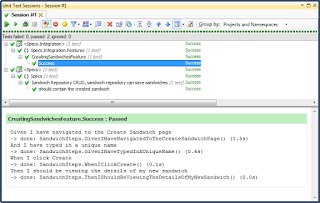
At this happy moment, refactoring or checking in can occur.Reports
How’s that project coming along? Depends on who’s asking. If it’s a client or management then we show them the report generated by SpecFlow (you can learn how to do that in the last 3 minutes of http://tekpub.com/view/dotnet-oss/3).
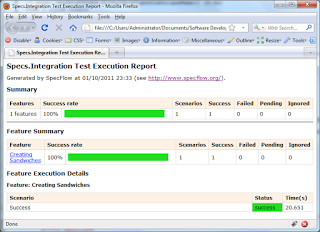
What if it is fellow developers asking for progress on a framework or product you are working on? We can go one better than what the console runner tells us, we can use MSpec to give them something groovy like this:
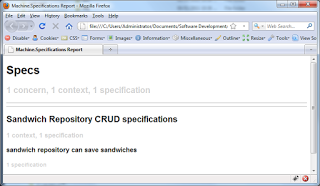
**Above: **MSpec reports for our context specifications – for developers, using developer terminology
If you install MSpec via NuGet then you need to grab a copy of mspec.exe from http://teamcity.codebetter.com/guestAuth/repository/download/bt188/.lastSuccessful/Machine.Specifications-net-4.0-Release.zip if you want to be able to product some fancy HTML reports.
Rob Conery explains how to set up MSpec reports so I’ll not repeat him.Conclusions
For many of the big guns in software development BDD is the ideal way to collaborate with clients and to specify exact behaviours of their system before a line of code is written. In the .NET world, SpecFlow is a great example of a tool that can facilitate these needs.
With unit testing, however, the focus needs to be on isolated chunks of code — you need to look at the test and see exactly what is occurring in fine-grained detail. Additionally, you want to give your unit tests structure, and you still want to focus on the behaviour of code. The familiar AAA (arrange, act, assert) pattern can be formalised using context specification tools like MSpec — allowing you to focus on behaviours and keep your tests localised.
In both scenarios, the tools chosen allow us to be more organised by writing out our specs first and getting not implemented results. There is potential here to reduce mental juggling and get ideas converted into specifications whilst not switching total focus away from the current task.
To conclude, I’ll remind you that I am taking an evaluative approach: whilst SpecFlow works great at the UI/Integration/Acceptance test level, I am yet to take MSpec for a real test run — I might hate it — my colleagues may hate it. The S#arp Arch guys seem to be happy with using it in this way. It would be no great shame to have standard NUnit unit tests. But if we can improve — then let’s do it.