A Simple Erlang Server in 10 Lines of Code
v:* {behavior:url(#default#VML);} o:* {behavior:url(#default#VML);} w:* {behavior:url(#default#VML);} .shape {behavior:url(#default#VML);}
Normal 0 false false false false EN-GB X-NONE X-NONE MicrosoftInternetExplorer4
/* Style Definitions */ table.MsoNormalTable {mso-style-name:”Table Normal”; mso-tstyle-rowband-size:0; mso-tstyle-colband-size:0; mso-style-noshow:yes; mso-style-priority:99; mso-style-qformat:yes; mso-style-parent:””; mso-padding-alt:0cm 5.4pt 0cm 5.4pt; mso-para-margin-top:0cm; mso-para-margin-right:0cm; mso-para-margin-bottom:10.0pt; mso-para-margin-left:0cm; line-height:115%; mso-pagination:widow-orphan; font-size:11.0pt; font-family:”Calibri”,”sans-serif”; mso-ascii-font-family:Calibri; mso-ascii-theme-font:minor-latin; mso-fareast-font-family:”Times New Roman”; mso-fareast-theme-font:minor-fareast; mso-hansi-font-family:Calibri; mso-hansi-theme-font:minor-latin; mso-bidi-font-family:”Times New Roman”; mso-bidi-theme-font:minor-bidi;}
Erlang is an interesting language currently consuming some of my spare time. I’m half way through Programming Erlang (book) and have just followed the example to create an IRC server and client. From that example I distilled the following pattern for creating a simple server that can be communicated with by name.
In this short example you will see how to create Erlang’s ultra-lightweight processes, how to alias them with a name, and how a process handles messages that you put into its mailbox (like a message queue).Code
You can also see the code on Github with a bit of syntax highlighting and better formatting (https://github.com/NTCoding/Erlang_Playground/blob/master/simple_server.erl).
%
-module(simple_server). %% name of this module
-export([start/0]). %% public interface of this module (a start function with no args)
%% Send messages to server using name of its process “simple_server” e.g simple_server ! message
start() ->
register(simple_server, spawn( fun() -> loop() end)).
loop() ->
receive
“quit” -> io:format(“Quit command received. Closing down server~n”);
Msg ->
io:format(“Received message: pn”, [Msg]),
loop() %% recursion keeps server alive and listening %%
end.
%Processes Communicate via Messages
In the example above I create a new process with the call to register(). In this example, the process is aliased with the name “simple_server” (first argument) and the second argument tells it to spawn another new process (a child process of simple_server) that begins executing the loop() function.
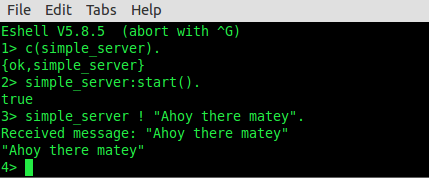
To communicate with a process, you send a message using the exclamation mark (“!”). In the screenshot below, I compile the simple_server module, start the server and then finally send the message at prompt 3 (3>).
I could have called spawn (as I did with the child process), instead of register(), which would have returned a process ID. I could have then sent messages to that process ID. In this example, though, I preferred to use register() so I could have a name (simple_server) instead of a numeric process ID.Reading Messages
Remember how the simple server spun up a new process that began executing the loop function? Well look again at loop function now….
It begins with the receive keyword, which means “get a message from my mailbox”. This mysterious mailbox is unique for each process, and messages go to the mailbox of the process you send them to.
After receive comes the pattern matching code. When the message is received from the mailbox it is compared against each of those patterns. In this case my message does not match the word “quit” so it drops through to the other option (which it does match), causing it to be printed out to the console (as per the screenshot).
After that message, again loop() is called — recursively spinning away waiting for subsequent messages to enter the mailbox that it will process.
When it receives the “quit” message, recursion halts and the server shuts down.
