Minimalist Claude Code Task Management Workflow
I decided to create my own claude code task management worfklow because the world does not have enough of those already.
I’ve been trying to remove some of the friction with my Claude Code setup. I’ve worked on some basic agents, like my TDD developer, and I’m happy with the progress there.
But one area I’m still not happy is with the overall task worfklow. The Claude Code todo list doesn’t persist across sessions, so when the context window gets full and you want to start a new conversation with a clear context window, it’s gone.
Instead, you can create a plan.md or todo.md . You tell Claude to list all the tasks and mark them off when they’re complete. And then you can close the conversation, start a new one, and work from the same todo list.
But this approach is a lot of faff. I don’t want to keep telling Claude “read the todo”, “pick the next item”, “mark this as completed”. My expectations of AI-assisted development are a little higher than that (do I sound like a diva?).
So then I looked for existing tools and frameworks. Surely this is a solved problem! I don’t want to use a different IDE so I avoided Kiro. Then I saw spec kit and spec kitty. I like the concepts of letting them manage the workflow, but there’s a lot of complexity and it kept going off the rails and it wanted to do lots of planning even for small tasks. Too heavy weight…
So I built my own lightweight worfklow…
You can find my custom workflow on GitHub: https://github.com/NTCoding/claude-skillz/tree/main/lightweight-task-workflow
Custom Claude Workflow
The idea for creating a custom workflow is already something I’ve tried. I’ve been doing large refactorings on a side project and I designed a system with a persistent storage and custom commands like /start-refactoring , /continue-refactoring , and /verify-refactoring .
I really loved the experience of just starting a new Claude conversation with a fresh context window and just hitting /continue-refactoring . This is the good stuff, this is what I want from AI-assisted coding.
So my challenge was to generalize the process so that I can use it for all my tasks and not just on this one refactoring project.
I did post on LinkedIn about this and the comments made me realise that, yeah, building a custom worfklow isn’t a crazy idea. Others are doing this and are happy with it. There’s doesn’t seem to be a solution that really solves this minimalist use case that everybody is using.
Workflow files & state machine
The current version of my workflow uses 3 files:
tasks.md— a simple todo list with names of tasks and status (completed or not)requirements.md— a more detailed description of each tasksession.md— a place where Claude provides short updates related to the current task so that if a conversation is closed and restarted it can pick up where it left off
Then there is a state machine that tells Claude specifically when and why to touch these files and enforces the expected behaviours. My workflow is triggered by the written word “continue” or “create a plan”.
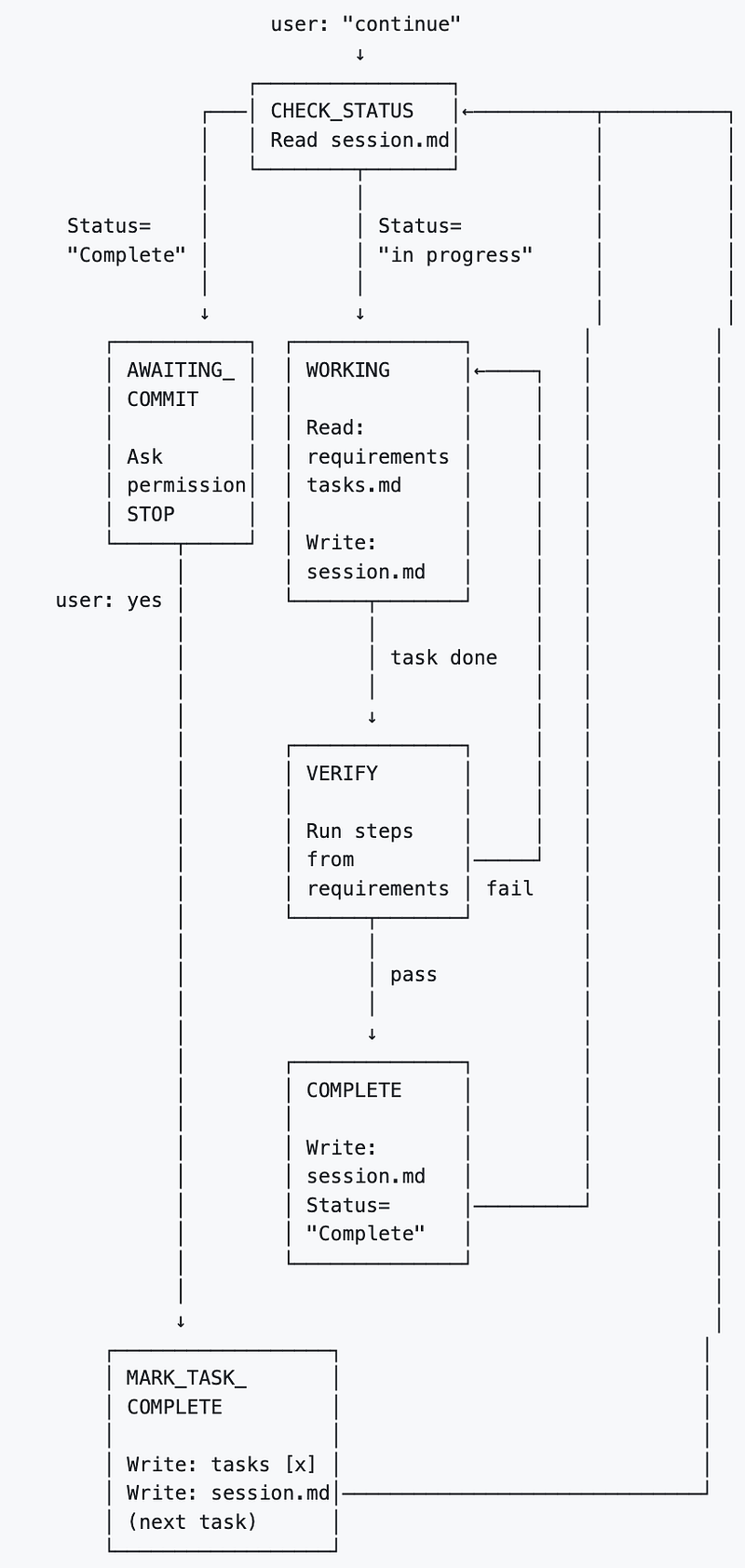
Getting Claude to follow the workflow took a lot of iterating and I was close to giving up a few time.
I couldn’t get it to work with just a written description. So I decided to try the state machine approach and that made big difference — the diagram accompanied by a written specification of the state machine.
**🚨 STATE DEFINITIONS - FOLLOW EXACTLY 🚨**

**CHECK_STATUS:**
```
ACTIONS:
1. Run pwd
2. Read .claude/session.md
3. Look at Status field
4. IF Status="Complete" OR "ready to commit" → Go to AWAITING_COMMIT
5. IF Status="in progress" OR missing → Go to WORKING

DO NOT: Read other files, launch agents, do anything except route
IF ERROR: STOP and tell user what failed
```
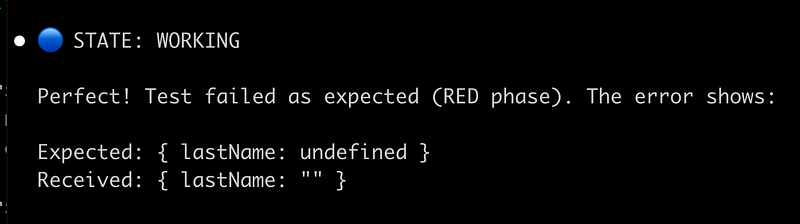
I added a rule to force Claude to start every message with the current state so that I can see if it has stopped following the process and to help it remember there is a process to follow.

Surprisingly, it does seem to work consistently now even though it took so much effort to find the right formula.
One thing I re-learned from this experience is that anytime you are relying on an LLM to follow a process written in a markdown file you’re in a vulnerable situation.
Bespoke workflows
Even though I follow a strict TDD workflow, I decided not to bake that part of my process into the task management workflow. And that was quite interesting aspect of putting this workflow together.
I would like to be able to use this flow without TDD and TDD without using this task management process. But that does come with trade-offs, it requires making the two components work together. It’s not always seamless.
With my refactoring workflow, it was more integrated, my task management + development worfklow.
This really interests me — we have this possibility to design custom workflows for every project we’re working on. How to implement tasks, how to validate them etc. Rather than going towards rigid spec-driven frameworks we can go the opposite way and radically design our own flow based on the kind of work we’re doing.
I’m really not sure how things will play out if we’ll converge or diverge on process.
Extensibility
One aspect of the design I did include in the workflow was verification. And actually, this is kind of part of my TDD workflow. So there was a little compromise.
The reason I added verification to this workflow was because I wanted to ensure that Claude did not progress from in progress to complete without building, linting, and executing tests.
To make this work, the initial setup of the workflow asks to define a verification step. This is saved in requirements.md and can easily be updated at any point. So for different projects, the verification can be different.
## Verification & Definition of Done
- npm run lint - no errors
- npm run build - successful
- npm test - all tests pass
You could easily plugin a custom script here which is the same script used by a TDD workflow.
Pushing the limits of Claude Skills
As you’ll see on GitHub, I implemented this task management as a Claude skill. Claude Skills do not have custom comands like /next-task and they do not use hooks. So for orchestrating processes, you are at the mercy of Claude following the instructions in your Skill.md
And like I said, it doesn’t do that consistently well. So I’m not sure I will continue to use skills for this or use skills for similar tasks in the future. But I have got to the point where it seems to be working consistently enough, so let’s see how I feel in a few weeks.
The skill seems to be erratic, too. Sometimes I’ll say “continue” which is the trigger word and it will seems to trigger the skill. Sometimes it doesn’t and I have to manually @ the skill to ensure it really is activated.
In plan mode, Claude would ignore the state machine and default to it’s built-in behaviours. The Skill.md has explicit rules telling it not to do this (this is one example of the many trial-and-error iterations I alluded to).
When other skills are triggered I noticed it stops printing the status updates, so there could be some interaction if you’re using multiple skills as well.
Is all of this a good idea?
I’m not saying you should use my custom workflow and I’m not encouraging you to create your own, either. Maybe you can offer me some advice about a better system you have?
But, this for me is a better system than the alternatives I have used so far: Claude todo list doesn’t persist; manually telling AI to read files and mark items as done is not what I want; and the spec frameworks I tried are a bit heavy and complex for my needs.
So, until Anthropic or someone else can build a simple lightweight task management system, I’m stuck with this.