Code Quality Foundations for AI-assisted Codebases
There are a few basic techniques you can use to increase the quality of code produced by AI coding assistants. These are easy techniques…

There are a few basic techniques you can use to increase the quality of code produced by AI coding assistants. These are easy techniques you can apply to any codebase so I highly encourage you to spend a little time setting them up.
The techniques fall into three broad groups
- Rules: define coding quality and standards
- Reviews: feedback loops to verify produced output
- Blocks: hard checks to ensure rules and reviews aren’t bypassed
In this post I’ll share the real examples from my open source side project living-architecture.
Rules
Rules define what code quality means in your codebases. I bundle standards, principles, and conventions all under this generic umbrella.Lint rules
Lint rules are one of the most effective techniques for baking in code quality since they are easy to enforce and many rules already exist, plus it’s easy to create your own.
My lint config contains rules like the following…
Type safety
I’ve banned any and as type assertions. Claude Code loves to use these a lot and can’t be trusted with them. I never use them myself anyway, there’s always a better alternative.
'@typescript-eslint/no-explicit-any': 'error',
'@typescript-eslint/no-unsafe-assignment': 'error',
'@typescript-eslint/no-unsafe-member-access': 'error',
'@typescript-eslint/no-unsafe-call': 'error',
'@typescript-eslint/no-unsafe-return': 'error',
'@typescript-eslint/consistent-type-assertions': [
    'error',
    { assertionStyle: 'never' },
],
'@typescript-eslint/no-non-null-assertion': 'error',
**Code complexity
**I’ve set a maximum code complexity per-function as 12 , maximum level of indentation as 3, and a maximum file size of 400.
When Claude hits these limits, it forces it to think about how to make the code more modular and it usually does a good job.
Without these limits Claude will absolutely create highly nested code and files with 1k+ lines.
'max-lines': [
    'error',
    { max: 400, skipBlankLines: true, skipComments: true },
],
'max-depth': ['error', 3],
complexity: ['error', 12],
**Naming
**I observed that Claude would use a lot of generic naming like helper and utils . It seems so lazy and just defaults to these generic names even when finding more accurate names isn’t hard.
So I use lint rules to ban the worst offenders. And it works. Claude hits the lint rule and has to think of a better name, and it always finds something more appropriate.
'no-restricted-imports': [
    'error',
    {
      patterns: [
        {
          group: ['*/utils/*', '*/utils'],
          message: 'No utils folders. Use domain-specific names.',
        },
        {
          group: ['*/helpers/*', '*/helpers'],
          message: 'No helpers folders. Use domain-specific names.',
        },
        {
          group: ['*/common/*', '*/common'],
          message: 'No common folders. Use domain-specific names.',
        },
        {
          group: ['*/shared/*', '*/shared'],
          message: 'No shared folders. Use domain-specific names.',
        },
        {
          group: ['*/core/*', '*/core'],
          message: 'No core folders. Use domain-specific names.',
        },
        {
          group: ['*/src/lib/*', '*/src/lib', './lib/*', './lib', '../lib/*', '../lib'],
          message: 'No lib folders in projects. Use domain-specific names.',
        },
      ],
    },
],
```Test coverage

In my [vitest configs](https://github.com/NTCoding/living-architecture/blob/main/packages/riviere-cli/vitest.config.mts) I set test coverage to 100%. Sometimes you might need to set more granular rules but I recommend starting out with 100 for everything and iterating from there.

```typescript
coverage: {
    reportsDirectory: './test-output/vitest/coverage',
    provider: 'v8' as const,
    exclude: ['**/*test-fixtures.ts'],
    thresholds: {
      lines: 100,
      statements: 100,
      functions: 100,
      branches: 100,
    },
},
Claude will often miss edge cases, even with detailed planning. 100% coverage requirements help to catch them. They don’t guarantee perfect tests but it’s better to have these thresholds than not having them.Standards and conventions
For other coding standards, principles and conventions I have a /docs/conventions folder:
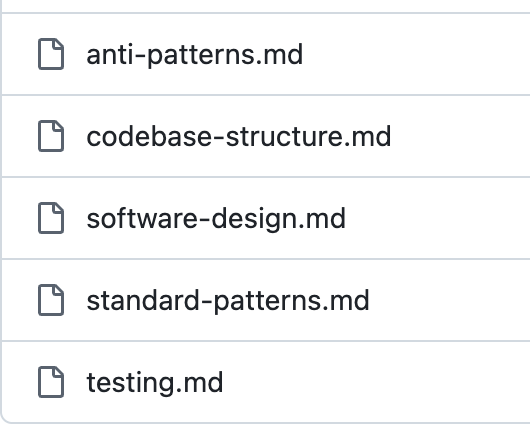
Then these are referenced in the main CLAUDE.md so that Claude knows when to read them.
## Code Conventions

When writing, editing, refactoring, or reviewing code:
- always follow `docs/conventions/software-design.md`
- look for standard implementation patterns defined in `docs/conventions/standard-patterns.md`
- avoid `@docs/conventions/anti-patterns.md`

The automatic code review agent enforces these conventions (see `./claude/automatic-code-review/rules.md`)

Code quality is of highest importance. Rushing or taking shortcuts is never acceptable.

## Testing

Follow `docs/conventions/testing.md`.

100% test coverage is mandatory and enforced.
Reviews
For anything that is not enforced by a tool (i.e. lint and test coverage) I recommend setting up reviews where a separate, specialist agent will review the work that has been done and provide feedback to the main agent.
In living-architecture I have fully automated reviews by a second agent that take place before the human in the loop is asked to review the work.Automated code review
In a previous post I mentioned the automatic code review technique I had setup with Claude Code hooks. In living-architecture I have found this to be extremely useful.
The automatic code review runs every time Claude has finished. It automatically kicks in. In living-architecture I set up the automatic code review to re-inforce the same conventions that are in CLAUDE.md
Architecture, modularity check

Check all production code files (not test files) against the following conventions:

Read @/docs/architecture/overview.md
Read @/docs/conventions/codebase-structure.md

Ensure that all code is in the correct place and aligns with boundaries and layering requirements.
Look at each line of code and ask "What is the purpose of this code? Is it related to other
code? Is it highly cohesive? Should it really be here or would it fit better somewhere else?"

Coding Standards

Check all production code files (not test files) against the following conventions:

Read @/docs/conventions/software-design.md
Read @/docs/conventions/standard-patterns.md
Claude will not always follow standards and guidelines, no matter how great your prompts and CLAUDE.mdfile are. But with a dedicated agent focused on review fewer things slip through the net the chance of the standards being applies increases substantially.
Whenever you see bad code, add the convention or pattern to one of the files and next time the reviewer will automatically pick it up.Functionality review
Similar to auto code review I setup an auto task check:
/docs/workflow/task-workflow.mdthat tells Claude to run thetask-checkcommand when it’s finished a piece of workCLAUDE.mdreferences/docs/workflow/task-workflow.mdtask-checkcompares the work done to the requirements
This is where defining requirements is crucial. My approach is to write PRDs and then break them down into tasks stored in task master.
So when I start a new session I say “next task” and Claude picks the next ticket and marks it in progress and starts working on it. Then, the reviewer agent knows what to check.
It’s also a good idea to use code quality tools like CodeScene, Sonarqube and CodeRabbit. The tools can built in your CI pipeline and also provide local feedback to your coding assistants via MCP.
In living-architecture — I use SonarQube and CodeRabbit.
Blocks
Whatever rules and guidelines you try to put in place, your AI assistant is going to try and find ways around them. So here are some simple techniques you can use to prevent that.git hooks
I highly recommend using git hooks. I do a full lint, typecheck, test verification for the whole monorepo on each commit.
NX has an effective caching system which means the performance of this is quite reasonable for the high level of confidence it provides.Prevent dangerous operations and file modification
All of the rules you set up can be bypassed AI. For example, when the git hooks fail Claude will always try to use --no-verify to bypass checks.
You can use Claude hooks to prevent these dangerous commands:
"PreToolUse": [
  {
    "matcher": "Bash",
    "hooks": [
      {
        "type": "command",
        "command": "$CLAUDE_PROJECT_DIR/.claude/hooks/block-dangerous-commands.sh"
      }
    ]
  }
]
I also recommend setting up file modification rules so that AI cannot modify your lint or test coverage configuration files.Branch protections
If you want to enforce that all commits to main go through your CI process then it’s good to setup branch protections on your repository.
In living-architecture pushes to main are forbidden and AI must satisfy SonarQube and CodeRabbit checks. I have my CodeRabbit setup to run the same code conventions that Claude will check locally:
knowledge_base:
  code_guidelines:
    enabled: true
    filePatterns:
      - "docs/conventions/software-design.md"
      - "docs/conventions/anti-patterns.md"
      - "docs/conventions/testing.md"
      - "docs/conventions/standard-patterns.md"
      - "docs/conventions/codebase-structure.md"
      - "docs/architecture/overview.md"
      - "docs/workflow/code-review.md"
With this approach, even if someone doesn’t run Claude or do the checks locally, the CI will ensure that those checks happen.
For consistency, I try to have a single source of truth for my rules and conventions, and then each tool like CLAUDE.md or .coderabbit.yml just points to the source of truth.
Both SonarQube and CodeRabbit are free for open source projects.