Coding Agent Development Workflows
I’ve been playing around with software development workflows for AI agents. here’s everything I know (it’s probably wrong)

I’ve been using Claude Code a lot for personal projects and work projects, and one of the most interesting aspects for me is shaping software development workflows. I think this is something we are all (or should be) thinking about and experimenting with right now.
It interests me because the workflows allow us to make AI behaviour more predictable and it allows us to bake quality and other personal and organizational conventions into our processes. I’m also seeing that it allows us to automate more so we can focus more of our efforts where we add the most value.
A few months ago I wrote about this but I’ve learned so much since then. I wanted to write another post to get all of this out of my head and structure my thoughts. And also to think about where this is heading and what will be different in 6 months and how to prepare for that now.
In this post I focus on the workflow. In the last post I focused on concrete techniques I’m using for baking quality into the process
Task Implementation
Recently, I’ve been iterating a lot on the task implementation part of the workflow. I define this phase as from the moment where an agent/develoer starts working on a ticket (assigns it to themselves, marks it as in progress) until there is a pull request open ready to be merged (or requiring feedback).
On my personal project, I’ve been experimenting with the goal of 100% AI-generated code but with the highest code quality possible. I don’t know how it will turn out, but the lessons learned will be valuable.
In this context, my workflow defines the agent’s goal as:
Work through the entire lifecycle autonomously until you have a mergeable PR or are blocked. Present the user with a completed pull request that is green and ready for review.
And the workflow looks like this:
What I’m trying to achieve here is that the agent will start working on a ticket and notify me once the whole pull request is finished, meets all of our quality standards and conventions, and is ready for me to review.
I think in 2026 we’ll see better tooling for orchestrating these types of workflows. Tooling that provides more determinism for gluing together different steps and processing structured inputs and outputs.
Shell scripts vs AI commands
In the workflow above, there are a mix of Claude commands (i.e. prompts) and bash scripts. Where possible, I try to use bash scripts for deterministic behaviour. For example, starting a task involves creating a feature branch in a standard manner and marking the item as in progress.
For the /complete-task workflow, this is a prompt and uses subagents to handle different steps. It requires more interpretation and isn’t so easy to automate with bash scripts. Although, there are certain parts that are automated with bash scripts like querying GitHub to get pull request feedback.
I use subagents for 2 reasons:
- when the main agent is working on a task, the context window will be full and it is less likely to follow instructions. A dedicated subagent with a fresh context is more likely to follow the instructions (it has a single clear focus)
- it won’t pollute the main agent’s context window
Task Completion
At the moment, task completion is the most complex part of my workflow. I wanted to use a subagent to orchestrate this process, but subagents can’t spawn other subagents.
/complete-task
    │
    ▼
Main agent runs pipeline directly
    │
    ├── Verify gate → FAIL → return to main
    ├── code-review subagent → FAIL → return findings + next steps
    ├── Task-check subagent → FAIL → return issues
    ├── submit-pr subagent → captures output
    ├── Check reviewDecision (CHANGES_REQUESTED = not mergeable)
    ├── Address ALL CodeRabbit feedback (comments + nitpicks)
    ├── Re-run submit-pr if fixes made
    └── Return SUCCESS with PR ready to merge
The first step is to run build, lint, test locally. Then it will run a local code review using the code review subagent and in parallel it does task-check. This is basically a QA - does the work that has been done match the requirements that are in the task (in this case the GitHub issue)
If both of those succeed, the next subagent will push the changes to GitHub and create a pull request. It will use the GitHub cli to wait for all of checks to complete:
gh pr checks --watch --fail-fast -i 30Currently I have some general CI checks and CodeRabbit and SonarQube that automatically review all pull requests. So if any of these checks fail, or request changes, or leave any nitpicks, the process instructions the agent to automatically fetch them using the GitHub GraphQL API.
gh api graphql -f query='
  query($pr: Int!) {
    repository(owner: "owner", name: "repo") {
      pullRequest(number: $pr) {
        reviewDecision
        reviewThreads(first: 100) {
          nodes {
            isResolved
            comments(first: 1) {
              nodes { body }
            }
          }
        }
      }
    }
  }' -F pr=$PR_NUMBER
At this point, if anything so far has failed, the agent is empowered to autonomously fix the issues. It is instructed to keep working and addressing feedback (from local checks or on the CI) until the PR is mergeable or it is stuck or needs some help.
It did take me a while to get this all setup, and I’m still improving the process, so there is a cost involved in setting all this up. But I’m at a point where it’s working and justifies the effort.
Single source of truth for conventions
Different AI agents and different tools are involved in this workflow. And it’s important that they are all aligned on the same conventions. Otherwise they might end up going round in circles and wasting time (local review says one thing and then CodeRabbit flags it as a problem for example).
So my recommendation is to have a single source of truth for your coding standards and conventions not coupled to any AI tool.
I put them in /docs/.... And then any agent or tool that is writing code or reviewing it can reference these documents — the agent writing the code, the local agent reviewing the code, and tools like CodeRabbit will all be aligned to your same conventions.
My coderabbit.yml looks like this:
knowledge_base:
  code_guidelines:
    enabled: true
    filePatterns:
      - "docs/conventions/software-design.md"
      - "docs/conventions/anti-patterns.md"
      - "docs/conventions/testing.md"
      - "docs/conventions/standard-patterns.md"
      - "docs/conventions/codebase-structure.md"
      - "docs/architecture/overview.md"
      - "docs/workflow/code-review.md"
One other recommendation is to point your code review tools and agents at your ADRs. I’ve actually seen an example of this where the code review bot provided a PR comment explaining that the implementation didn’t align with an ADR and referenced the ADR specifically. I don’t have ADRs in the example above (but I will add it).
Build quality in, continuous improvement
Once you have a workflow and you have your context (your conventions, architecture docs, ADRs, and coding standards that all agents reference), then things get really exciting. The process of continuous improvement begins. This is where I’ve been having a lot of fun.
The mindset I have is, “how can I improve the process so that any error or manual intervention that I’ve had to make can be avoided next time.” For example, when CodeRabbit or SonarQube identifies an issue, I try to research linting rules. Can I find a linting rule that will catch this problem locally before it gets to these tools?
If linting rules aren’t possible then I look at ways to add this to the coding conventions or architecture documentation so that either the main agent or the local code review will catch it first.
On the contrary, I also wonder if at some point I will remove some of these checks. Maybe I will skip the local checks and just let the agent build the feature and create the PR and let all of the review happen there. If I can optimize the local development cycle so that it produces high quality to spec, then we speed up the overall process by having fewer checks. I’m not there yet, I still like having the local checks and not relying on CodeRabbit 100%.
Key challenges for teams and organizations
Based on my learnings and trying to take all these ideas and see how they apply to modern organizations, there are a few intersting challenges that we’ll have to face.Defining standards
The first challenge is around consistency and standards. I think AI-assisted workflows will work best when there are more standards and clearer guidelines to follow. Some teams already do this, but some teams have many implicity conventions and different team members prefer different principles and patterns.
I think teams that excel are going to be more explicit with their coding standards and conventions. I.e. the context.Continuous improvement mindset
Another challenge I see is the continuous improvement aspect. For engineers who like writing code and building systems, it could be a big change in mindset. Now, a key part of the job is to automate software development and identify mistakes or improvement opportunities so that AI produces better code and architecture.
Rather than writing code, I think it might be more that we need to think about “how can we improve the workflow and context so that we don’t need to manually write this line of code”. Software engineering might be more workflow + context engineering.Organizational vs team conventions
A challenge we always face is deciding at what level a convention applies. Where do we standardize on tech stacks and architecture patterns and where do teams have freedom to go in their own direction. And this will definitely be a big challenge for defining workflows.
Allowing teams to have freedom could be crucial, as they discover new tools and techniques that others can benefit from, or are more suited to their local context. Equally, having some standard choices around conventions and tooling can bake in a minimum level of good practices and improve efficiency.
As a starting point, I think a good middle ground is always to be principles-driven. So you might define an AI-development principle such as “Each team must have documented coding standards and ADRs that are accessible to all AI agents and code review tools”. Each team can then define their own standards and use their own tooling to satisfy this principle.
Planning and Task Breakdown
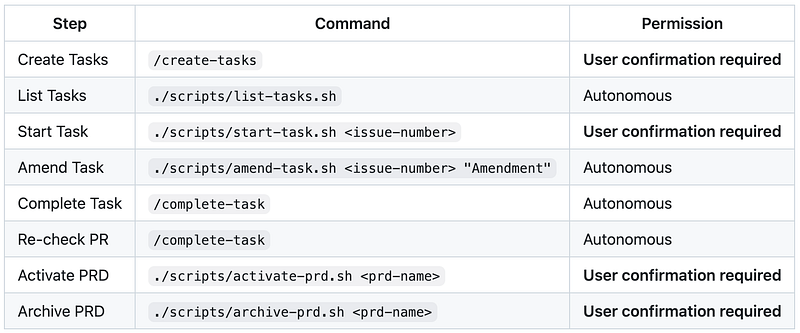
You might have noticed in the task workflow table earlier that I have steps for managing PRDs and creating tasks. This is an important part of the process that I didn’t dive into: the phase before implementation where you break down requirements into actionable tasks.
I work with a PRD specialist agent to create the PRD first. This agent goes through a structured lifecycle (draft, planning, approved) and asks probing questions rather than just transcribing what I say. Once the PRD is approved, I activate it and use /create-tasks to break it down into specific implementation tasks.
This phase is actually really important because the quality of the task definition directly impacts the quality of the implementation. When you provide the AI with clear instructions, specific acceptance criteria, and edge cases to consider, the chances of getting the output you want go up significantly.
My /create-tasks command enforces a 10-section structure for every task including deliverable, context, traceability to PRD requirements, acceptance criteria, edge case scenarios, implementation guidelines, testing strategy, and verification commands. If any section can’t be completed with specific details, the task gets rejected. This structure forces clarity upfront and ensures the implementing agent has everything it needs.
I built this myself because I wanted to learn from the ground up, but there are spec-driven frameworks out there that handle this phase. If you’re just getting started, it might be worth looking at what already exists rather than rolling your own.
These are just my personal learnings
I’m not saying these are the best practices. I don’t really know what the best practices are. And anyway, things are changing so quickly that all of this will be out of date soon anyway.
These are just my personal learnings from trial-and-error and also looking at what other people are doing. I hope you found some of this useful, and if you have any suggestions or ideas that are missing I would love to hear it. I’m in full learning mode.
Thanks to everyone who has already shared feedback with me. Every time I write a post or share an idea on LinkedIn I receive ideas and insights from other people which is really helping me.
I’ve learned a lot from many sources but Paul Hammond and Simon Martinelli regularly provide feedback on LinkedIn and I’m always checking what they’re upto, so special mention to them and I definitely recommend following them.