Deterministic Code Conventions with Oxlint
Categorize each piece of code and then define conventions for each category, using Oxlint for enforcement.
The latest adventure on my journey to automate software conventions (mostly for AI but also for humans) has involved Oxlint. A TypeScript linter written in Rust.
My colleagues at PayFit have been pretty impressed with its performance, so I used it to implement the first version of a concept I’ve been thinking about for a while.
The idea is very simple: every piece of code must have a label indicating what type of code it is. Is it a repository, a validator, an error, a formatter. Based on the label you can then apply rules about where the code lives and how it can be combined with other code.
For example, any code with the decorator /** @riviere-role cli-entrypoint */ can only live in a folder that matches the following pattern: src/features/{feature}/entrypoint. If you put that code in a different folder, Oxlint will report an error. And if you put other code in that location Oxlint will also report an error.
Location-based rules are just the starting point. You can actually do much more to enforce your conventions.
The benefits of this approach are hard guardrails that cannot be violated and less reliance on AI decision making: AI no longer has freedom to decide where code lives.
I’m currently exploring this concept in my Riviere Living Architecture project.
Rules Configuration with DSL
I’ll start by sharing the configuration DSL I’ve landed on. I decided to go with a TypeScript DSL.
export const config = roleEnforcement({
  canonicalConfigurationsFile: '.riviere/canonical-role-configurations.md',
  roleDefinitionsDir: '.riviere/role-definitions',
  roles: allRoles,
  locations: [
    location<RoleName>('src/features/{feature}')
      .subLocation('/entrypoint', ['cli-entrypoint'], {
        forbiddenImports: ['**/infra/persistence/**'],
      })
      .subLocation('/commands', commandRoles, { forbiddenImports: ['**/infra/cli/**'] })
      .subLocation('/queries', queryRoles, { forbiddenImports: ['**/infra/cli/**'] })
      .subLocation('/domain', domainRoles)
      .subLocation('/infra/external-clients/{client}', externalClientRoles)
This model is based around locations which are similar to a typical layered architecture but more granular.
For example, in my codebase src/features/{feature}/commands is where all command use cases live. These are use cases that perform a write operations that mutate the state of the application.
And src/features/{feature}/queries is for query use cases that read the state of the application without modifying it.
The /commands sublocation is only allowed to contain code that is decorated with the roles defined in commandRoles. And that is just an array of names (RoleName is a union type):
const commandRoles: RoleName[] = [
  'command-use-case',
  'command-use-case-input',
  'command-use-case-result',
  'command-use-case-result-value',
  'command-input-factory',
]
What this means is, the following code can live in /commands:
/** @riviere-role command-use-case */
export class ExtractDraftComponents {
  constructor(private readonly extractionProjectRepository: ExtractionProjectRepository) {}
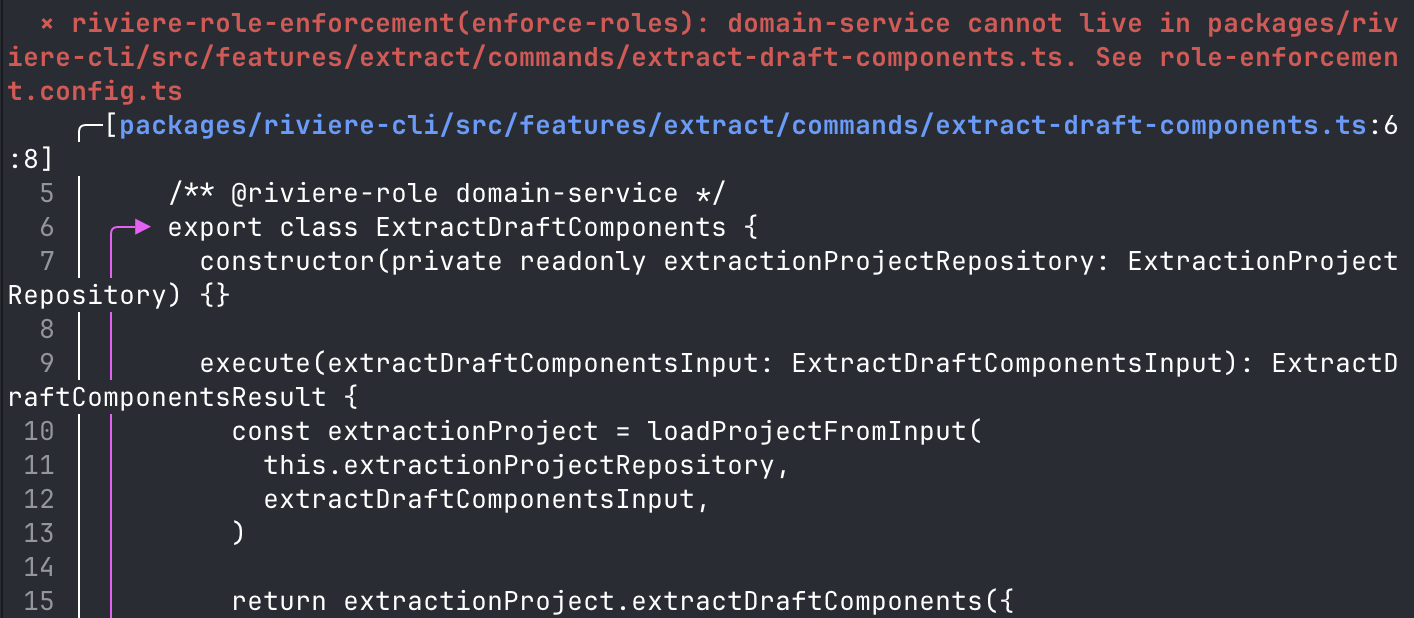
But if I remove /** @riviere-role command-use-case */ or change it to a value that does not exist in commandRoles, then Oxlint will report an error.
➜  living-architecture git:(main) pnpm role-check

  × riviere-role-enforcement(enforce-roles): domain-service cannot live in packages/riviere-cli/src/features/extract/commands/extract-draft-components.ts. See role-enforcement.config.ts
    ╭─[packages/riviere-cli/src/features/extract/commands/extract-draft-components.ts:6:8]
  5 │     /** @riviere-role domain-service */
  6 │ ╭─▶ export class ExtractDraftComponents {
  7 │ │     constructor(private readonly extractionProjectRepository: ExtractionProjectRepository) {}
  8 │ │
  9 │ │     execute(extractDraftComponentsInput: ExtractDraftComponentsInput): ExtractDraftComponentsResult {
 10 │ │       const extractionProject = loadProjectFromInput(
 11 │ │         this.extractionProjectRepository,
 12 │ │         extractDraftComponentsInput,
 13 │ │       )
 14 │ │
 15 │ │       return extractionProject.extractDraftComponents({
 16 │ │         allowIncomplete: extractDraftComponentsInput.allowIncomplete,
 17 │ │         includeConnections: extractDraftComponentsInput.includeConnections,
 18 │ │       })
 19 │ │     }
 20 │ ╰─▶ }
 21 │
    ╰────

Found 0 warnings and 1 error.
Finished in 1.3s on 238 files with 94 rules using 8 threads.
Role enforcement completed in 1402ms
Similar tools and approaches exist. Xmolecules is a good starting point.
Beyond location-based rules
Location-based rules are the main reason I went down this direction because AI agents weren’t following written instructions well enough, regardless of how precise I tried to make them.
But they weren’t the only problems. I found AI (Claude Code) to be quite poor at reasoning about coupling in a system. It created dependencies that were unnecessary. So in the DSL configuration, I added coupling-based rules as well.
These types of rules work best when combined with more typical lint rules like complexity limits and syntax restrictions. I discussed this in a previous post.
Here, you can see that no components in the /commands location can import CLI-related code. That is just a wrong dependency. CLI-related code is the entrypoint of a system, it’s an adapter from external formats to internal formats. A command use case should be decoupled from that, you shouldn’t be parsing raw input data in a command-use-case. forbiddenImports prevents that.
.subLocation('/commands', commandRoles, { forbiddenImports: ['**/infra/cli/**'] })Alternatively Dependency Cruiser is a great tool for defining dependency-based rules
I also define rules at the role level, to constrain roles. Here, for example, you can see the command-use-case is highly constrained. It must have exactly 1 public method and it can only accept objects annotated with command-use-case-input and is only allowed to return command-use-case-result.
role('command-use-case', {
    targets: ['class', 'function'],
    allowedInputs: ['command-use-case-input'],
    allowedOutputs: ['command-use-case-result'],
    forbiddenDependencies: ['command-use-case'],
    minPublicMethods: 1,
    maxPublicMethods: 1,
  }),
This is another guardrail I added because Claude was passing CLI models into the use case layer which is forbidden because it creates undesirable coupling.
Also, a command-use-case is not allowed to import other components annotated with command-use-case. That’s the forbiddenDependencies rule. This is because Claude was doing this even though the instructions said not to.
Claude just gets into a mindset of “I need to make this code compile and pass lint and I’ll do whatever I can to satisfy that”. Quality, conventions and preferences go flying out of the window. “You’re absolutely right, I failed to follow conventions. I promise I won’t forget next time.”.
type system vs lint rules
You may be thinking “shouldn’t the type system be doing a lot of this?”. And I think about this a lot. For now, I’m still experimenting with the lint-based approach. But some of these rules could be pushed into the type system and lint could be used to validate that those types are used.
E.g. you have a CommandUseCase base class that enforces allowedInputs and allowedOutputs so they can be removed from the rules. The rules then just have to enforce that any code using the command-use-case role must inherit the CommandUseCase base class.
Avoid bouncing off the guard rails
There is a very serious chance with this approach that your AI agent is just going to keep bouncing from one guard rail to another and get stuck. Burning loads of tokens and taking a long time to do simple things.
So it’s also important to provide guidelines up front to prevent hitting the guard rails, and guidelines when AI does hit the guard rails so it can recover quickly.
In the config I shared above, those concerns are handled here:
export const config = roleEnforcement({
  ...,
  canonicalConfigurationsFile: '.riviere/canonical-role-configurations.md',
  roleDefinitionsDir: '.riviere/role-definitions',
roleDefinitionsDir is the directory that contains a markdown file describing each role and how to use it properly. So AI can read those before writing code and choose the right roles. Equally, the AI is instructed to re-read these files when it hits a guard rail.
These files contain instructions on common misclassifications like “Not a cli-entrypoint: entrypoints translate external input (CLI flags) into a command-use-case-input and call the command. They do not load aggregates.”
And also guidelines about when responsibilities are mixed like “Constructing the input object from CLI flags — command-input-factory responsibility leaking in”. This problem was something I observed a lot, mixing different types of code.
I also started to create a few skills to help with initial classification and refactoring code that is tightly coupled.
In the code sample you can also see canonicalConfigurationsFile. This file tells AI how to fit the roles together into common configurations.
raw CLI args
     │
     ▼
[cli-input-validator]
     │ validated args
     ▼
[command-input-factory]
     │ command-use-case-input
     ▼
[command-use-case] → see: Command Use Case Pattern
     │ command-use-case-result
     ▼
[cli-entrypoint]
     ├── error → [cli-output-formatter] → exit
     │            uses [cli-error] for error codes
     └── success → [cli-output-formatter] → CLI output
Extreme standardisation
Looking at the previous examples, there is obviously a risk here that not all code fits these patterns and AI might force-fit code to fit into the patterns for use cases that require something different. And this is a very philosophical topic.
My mindset is, I want to start with the highest constraints possible. And each time we have code that doesn’t fit the constraints then evolve the model to support the new use case. This will be done as a combination of me reviewing the code, and me providing guidelines to AI to stop and discuss with the user when adding new code that seems to not fit the existing model.
My reason here is that I believe the more highly-constrained and conventional the codebase, the more maintainable it will be and easier it will be for humans and AI to work with over the long-term.
The mantra is: everything that can be standardised will be standardised.
Do I recommend this approach?
This is something I’ve been experimenting with for the last 5 or 6 weeks on my personal projects. I am not using this approach in production. So I cannot put my seal of approval on this approach and say you should definitely be using it.
On the contrary, I do believe this is the direction things are heading, along with hook-based workflows. This approach gives very granular quality controls that AI cannot bypass. It’s not a markdown file that AI can choose to ignore, it is a lint job that will hard fail every violation.
I will be continuing to use and evolve this concept where I can. Although for now I would keep it in the experimental category. It requires an upfront and ongoing investment, and I need more data points to verify that the payoff is worth it.
My mindset here is to find a solution that guarantees the quality of the end result, even if it slows down AI or burns more tokens. If it produces consistently good results then I’ll focus more on efficiency later.
Of course, all of this will be rendered irrelevant if someone releases a decent model that can reliably follow instructions in markdown files.