Hook-driven dev workflows with Claude Code
Using Claude Code hooks to build enforced, testable development workflows with a proper workflow engine, state persistence, and agent teams.
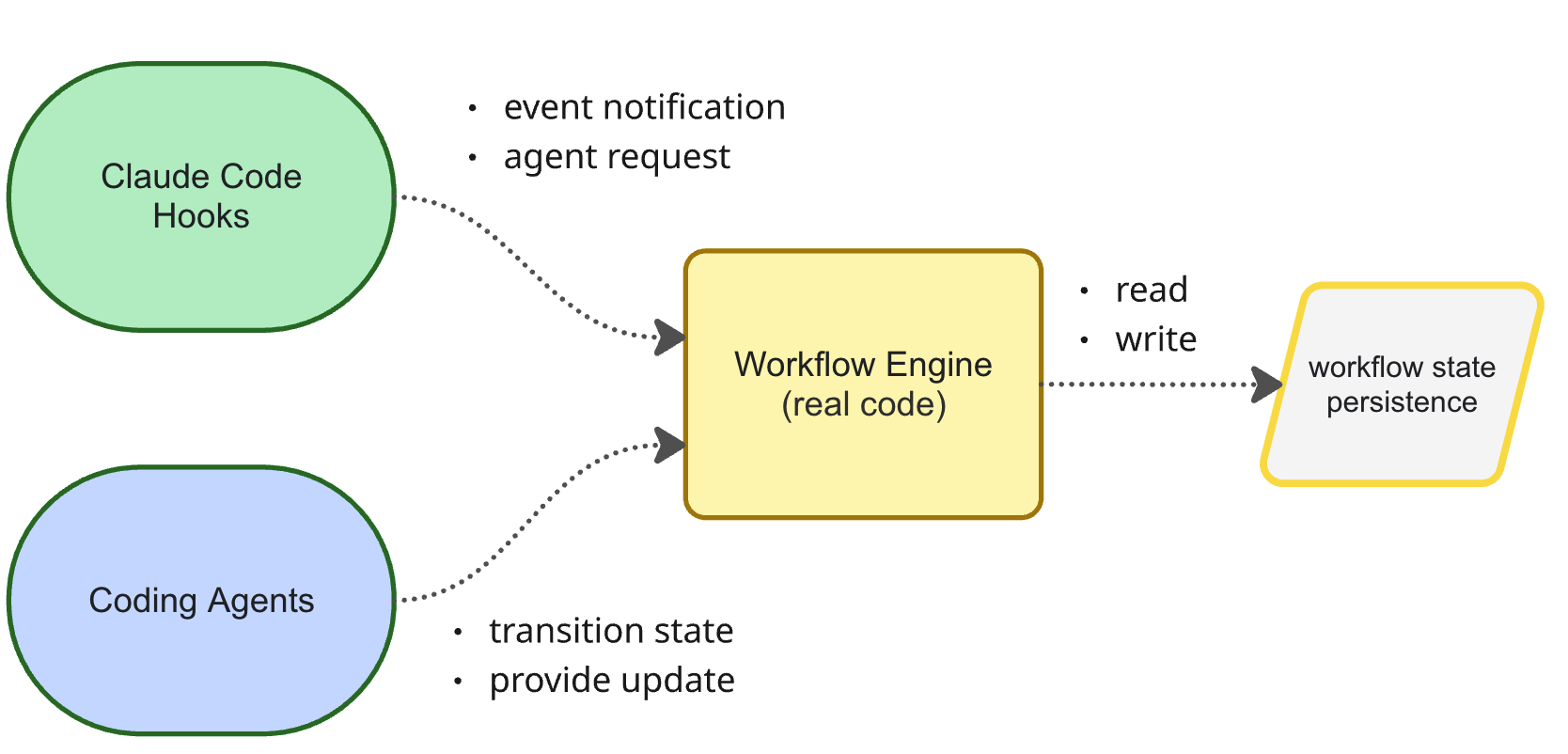
AI works best for me when it takes care of the workflow itself and allows me to focus on the business goals and architecture. I don’t want to be constantly prompting and guiding the agent to do the right thing, to run code reviews etc. It’s not enjoyable and it’s boring.
I’ve had a lot of success introducing deterministic workflows on repositories I fully control. I own the lint rules, the git hooks, the code review steps, and I can bake those into the process. I am consistently getting good results.
However, I am not getting good results when I need to work in legacy codebases, or codebases where I do not control all of those parameters. How can I get Claude to apply the same workflow and coding standards in those situations?
The solution I’ve arrived at is Claude Code hooks. I realised that they can do a lot more than I understood. They allow a highly enforced workflow with strong guardrails, written in a proper programming language, with 100% test coverage.
I’ve been experimenting with this approach in combination with Claude Code agent teams. It’s not strictly necessary, but I like it because you can see exactly what each agent is doing and they can discuss things directly with each other.
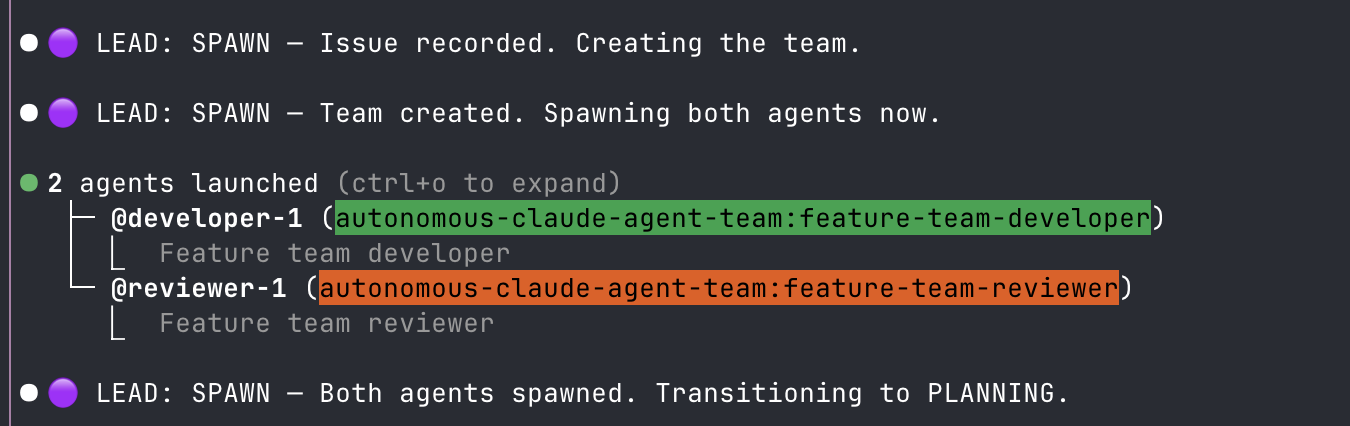
There is a full code example on GitHub showing how you can do this. It’s very easy, just needs a bit of patience to set up and iron out the kinks.
Architecture overview
The architecture for this solution is very simple. It is based on two components. You have the workflow engine and you have the session persistence. Triggered by a single slash command (see the GitHub repo for setup instructions).
The workflow engine encapsulates the state persistence. It prevents transitioning from one state to another if all requirements are not met. For example, you cannot transition from planning to reviewing. You have to go via developing to implement something first.
Equally, the workflow engine will block operations in each state. For example, when in the developing state, git commit is banned. git commit is only allowed in the committing phase which can only be transitioned to after the reviewing phase.
You don’t have to use these rules, they are just examples.
DDD perspective: You can think of the
workflowengine as an aggregate protecting its internal state. The Claude Code hooks are events that inform the aggregate something has happened. The operations on the workflow facade are commands — and theworkflowcan reject commands if they violate domain invariants. Inside, it can store the current state, a list of events to rebuild state from, or both. Everything must go through the workflow’s public interface and not modify it’s state directly to ensure all rules and invariants are correctly applied.
Example workflow
The first step to implementing your own solution is to think about the workflow you want. Here are some of the requirements I had for the workflow:
- Create a GitHub issue: Take the user’s requirements and create a GitHub issue (so that when reviewing the PR at the end, the reviewers can look at the issue to validate the work done matches the requirements)
- Work on a feature branch: all work should be done on a dedicated branch, no pushing to main
- Draft pull request: the end result is a draft PR ready for human review
- CodeRabbit review: the code must be reviewed by CodeRabbit and feedback addressed before human review
- Use a team: have specialist
developerandrevieweragents to optimise context window usage - Respawn team members: split the work into iterations and respawn the team members for each iteration, so each iteration gets an agent with a fresh context window
So, I defined my conceptual workflow with statuses like:
spawn: create the GitHub issue and spawn the team membersdeveloping:developerimplements the current iterationreviewing:reviewerreviews the current iterationcommitting:developercommits changes afterreviewerapprovescode rabbit review:developerrequests a review from CodeRabbit after all iterations are completecreating draft PR: after CodeRabbit review complete
Then I started to implement it. Here’s the state machine:
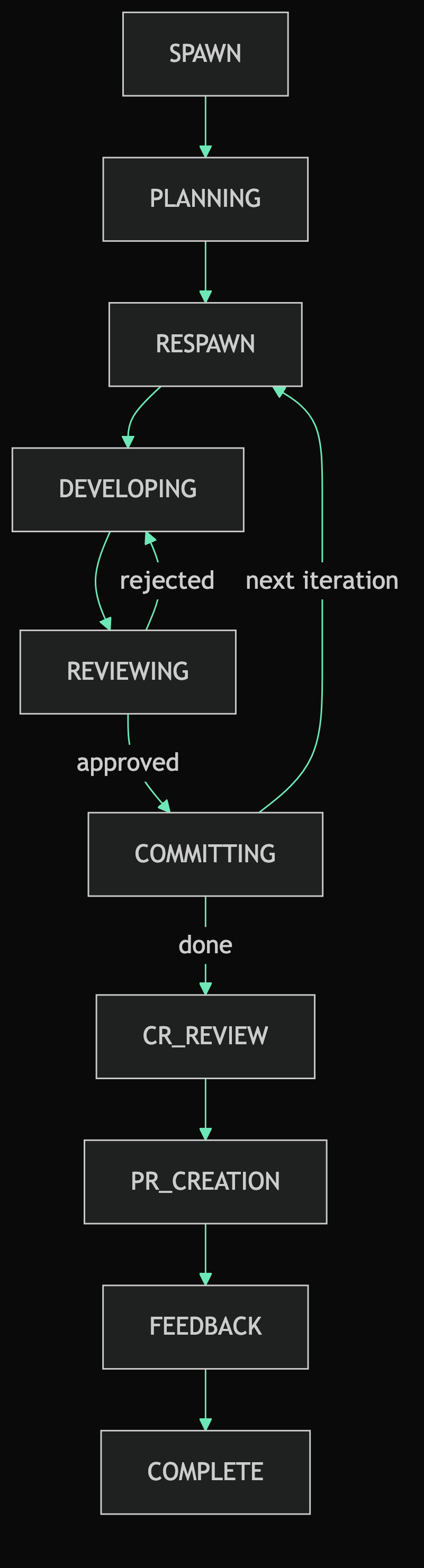
RESPAWN happens at the start of every iteration. It shuts down the existing developer and reviewer and spawns fresh agents with a clean context window to tackle the next iteration (you could add batchign here and spawn every n iterations).
Implementation
The implementation is quite straightforward:
- Wire up Claude Code hooks
- Teach agents how to invoke workflow commands
- Build the internal workflow implementation
Wiring up hooks to your workflow
For each Claude Code hook that you care about, you wire it up to the workflow.
In this example, the SubagentStart injects the relevant instructions into the subagent so that we don’t rely on the agent’s system prompt. Each time we transition state and spawn a new developer it gets reminded of what it needs to do in the current state.
{
  "SubagentStart": [
    {
      "hooks": [
        {
          "type": "command",
          "command": "npx tsx ${CLAUDE_PLUGIN_ROOT}/src/autonomous-claude-agent-team-workflow.ts",
          "timeout": 30
        }
      ]
    }
  ]
}
The information about each state is stored in a separate file where the workflow can access it. It’s not bundled into the team lead’s system prompt.
// Load the relevant file from /states and inject it into the command output
const procedurePath = getProcedurePath(state.state, deps.getPluginRoot())
const procedureContent = deps.readFile(procedurePath)
const context = buildStateContext(state, procedureContent)
return { output: formatContextInjection(context), exitCode: EXIT_ALLOW }

// Find the file in /states and read its content
export function getProcedurePath(state: StateName, pluginRoot: string): string {
  const filename = state.toLowerCase().replace(/_/g, '-')
  return `${pluginRoot}/states/${filename}.md`
}
For example, here’s what the states/developing.md file looks like — this is what gets injected into the team lead when the workflow enters the DEVELOPING state:
# DEVELOPING State

You are overseeing the developer's implementation work.

## TODO

- [ ] Identify current iteration item from `current_iteration_task` in the
      injected state context
- [ ] Send developer the task assignment — send `current_iteration_task`
      verbatim, do not paraphrase or add scope
- [ ] Wait for developer to message you they are done — be patient, do NOT
      check in or nudge
- [ ] Transition to REVIEWING:
      `/autonomous-claude-agent-team:workflow transition REVIEWING`
- [ ] Only after transition succeeds — notify reviewer their work can begin

## Constraints

- Never assign more than the single task recorded in `current_iteration_task`
- Do NOT run lint yourself — the developer runs strict lint before signalling done
- If developer reports a blocker, transition to BLOCKED
The SubagentStop hook is used to record that the teammate shut down in the workflow event log. So, if the team tries to transition to a new state, the workflow can reject the command because it’s waiting for a team member to shut down.
{
  "SubagentStop": [
    {
      "hooks": [
        {
          "type": "command",
          "command": "npx tsx ${CLAUDE_PLUGIN_ROOT}/src/autonomous-claude-agent-team-workflow.ts",
          "timeout": 30
        }
      ]
    }
  ]
}
As I said, I like to have 1 entrypoint that handles everything, so all hooks invoke the same code, and the code inspects the hook and decides how to handle it:
function runHookMode(deps: WorkflowDeps): OperationResult {
  ...
  const handler = HOOK_HANDLERS[common.hook_event_name]
  ...
  return handler(cachedDeps)
}

const HOOK_HANDLERS: Readonly<Record<string, (deps: WorkflowDeps) => OperationResult>> = {
  SessionStart: (deps) => handlePersistSessionId([], deps),
  PreToolUse: (deps) => runPreToolUseHooks(deps),
  SubagentStart: (deps) => handleSubagentStart([], deps),
  TeammateIdle: (deps) => handleTeammateIdle([], deps),
  SubagentStop: (deps) => handleSubagentStop([], deps),
}
Hooks can also be useful for preventing agents from doing things they shouldn’t throughout the current state. For example the PreToolUse hook can be used for rules like “No git commits allowed during planning phase”:
{
  "PreToolUse": [
    {
      "hooks": [
        {
          "type": "command",
          "command": "npx tsx ${CLAUDE_PLUGIN_ROOT}/src/autonomous-claude-agent-team-workflow.ts",
          "timeout": 30
        }
      ]
    }
  ]
}
I actually think that is an ugly and fragile part of Claude Code: having to wire up the workflow to many hooks in a JSON file. What I would prefer is to just register my workflow in one place to receive all hook events and ignore the ones it doesn’t care about.
Teach agents how to invoke workflow commands
When the team lead wants to transition to a new state it needs to invoke the workflow transition command. You do that like this, inside the agent’s instructions:
The ONLY way to change state is:

/autonomous-claude-agent-team:workflow transition <NEW_STATE>
The goal here is to force all operations to go through the workflow’s public API. We don’t want the agents directly modifying state persistence directly. Encapsulation is crucial for reliability and simplicity.
Implement your workflow engine
Once you have your hooks and agents configured to use your workflow, the rest should be very familiar. It’s just programming. Type safety, test coverage, good naming, modelling, all that stuff.
For example, you can use Zod to define a schema for your workflow state machine and internal state:
// each state and it's allowed transitions
export const TRANSITION_MAP: Readonly<Record<StateName, readonly StateName[]>> = {
  SPAWN: ['PLANNING'],
  PLANNING: ['RESPAWN'],
  RESPAWN: ['DEVELOPING'],
  DEVELOPING: ['REVIEWING'],
  REVIEWING: ['COMMITTING', 'DEVELOPING'],
  COMMITTING: ['RESPAWN', 'CR_REVIEW'],
  CR_REVIEW: ['PR_CREATION'],
  PR_CREATION: ['FEEDBACK'],
  FEEDBACK: ['COMPLETE', 'RESPAWN'],
  BLOCKED: [],
  COMPLETE: [],
}

// internal state that is persisted to file and reloaded
export const WorkflowState = z.object({
  state: StateName,
  iteration: z.number().int().nonnegative(),
  githubIssue: z.number().int().positive().optional(),
  featureBranch: z.string().optional(),
  developerDone: z.boolean(),
  eventLog: z.array(EventLogEntry),
  ...
})
You get the idea, right? You have events coming in and APIs being called, and you build your implementation and persistence.
Persistence
You can persist the state of your workflow however you want. In the example, state is stored in ${CLAUDE_PLUGIN_ROOT}/feature-team-state-<SESSION_ID>.json like this:
{
  "state": "DEVELOPING",
  "iteration": 2,
  "githubIssue": 98,
  "featureBranch": "feature/add-invoice-pdf-export-98",
  "currentIterationTask": "Iteration 2: Add PDF rendering for line items",
  "developerDone": false,
  "lintRanIteration": 1,
  "developingHeadCommit": "abc123",
  "eventLog": [
    // ...
  ]
}
Activating the workflow
To actually start the whole workflow and the team, you can just create a command like this:
First, read the file at `${CLAUDE_PLUGIN_ROOT}/agents/feature-team-lead.md` and assume the role of the feature-team-lead.

Then initialize the feature team state:

```
/autonomous-claude-agent-team:workflow init
```

The init command outputs a checklist. Execute each item in order — do NOT skip ahead to transition.
Then inside your team lead role, you give it the minimum instructions needed to function and how to build its teams:
You are the feature team lead. You coordinate the team — you do not write code
and you do not review code.

**Responsibilities:** assign work to `feature-team-developer` and
`feature-team-reviewer`, manage state transitions, surface blockers to the user.

...

**Prefix every message** with the current state emoji and name:

| State       | Prefix                            |
| ----------- | --------------------------------- |
| SPAWN       | 🟣 LEAD: SPAWN                    |
| PLANNING    | ⚪ LEAD: PLANNING                 |
| RESPAWN     | 🔄 LEAD: RESPAWN                  |
| DEVELOPING  | 🔨 LEAD: DEVELOPING (Iteration N) |
| REVIEWING   | 📋 LEAD: REVIEWING                |
| COMMITTING  | 💾 LEAD: COMMITTING               |
| CR_REVIEW   | 🐰 LEAD: CR_REVIEW                |
| PR_CREATION | 🚀 LEAD: PR_CREATION              |
| FEEDBACK    | 💬 LEAD: FEEDBACK                 |
| BLOCKED     | ⚠️ LEAD: BLOCKED                  |
| COMPLETE    | ✅ LEAD: COMPLETE                 |

...
Two important things to keep in mind:
- If you’re using Claude Code agent teams, when you tell the team lead to assign work to the
feature-team-developerit will look for a subagent with that name in.claude/agentsso ensure the file exists - As mentioned before: there is no need to bloat the system prompt of the agents with the full state machine and all rules. Your hooks can inject the relevant information after each state transition so the agent only knows what it needs to know for the current state
And one useful tip: the reason I tell the team lead to prefix every message is so that I know it hasn’t forgotten its identity. The hooks will check every message, and if the prefix is not there it will re-inject the identity instructions back into the team lead (this happens after compaction).
How reliable is this? Do I really recommend it?
I’ve been chasing the holy grail of an effective Claude Code workflow (that does all the boring stuff automatically) for over 6 months. I’ve tried various approaches, and this is something I’ve been experimenting with on real projects over the past week.
So I cannot say it’s reliable and I cannot 100% recommend it. However, my initial feeling is that this has a lot of potential. It’s not hard to implement, and you can implement mostly in full code that is 100% tested.
The key thing with this approach, is that every time Claude doesn’t behave how you want it to, you can implement new logic in your workflow to prevent bad behaviours or to enforce certain guardrails or inject content at the right moment to remind the agent how to do its job.
So far, I have not hit a limitation that cannot be solved. There have been lots of issues, but each time, I’ve been able to update the workflow and get Claude to behave how I want it to on the next run. But the problem is, it’s a bit low level and hacky at times.
There are other approaches though. If you are happy with less autonomy, you can simply create Claude Code slash commands for each action and manually invoke them yourself. Or you can just describe the process in a markdown file and hope Claude Code follows it (spoiler: it goes off track a lot and it drives you mad).